
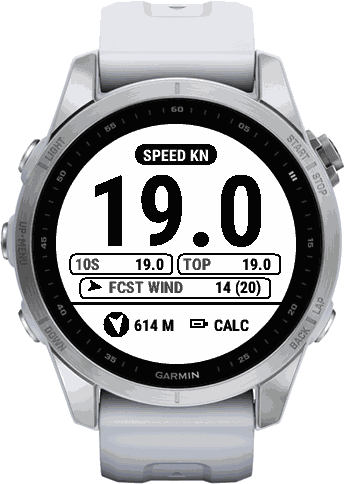
Try it free. Then a year at a time.
Five steps. You only need your watch and your phone.
Install Kuling for free
Your first 4 trips are free
A trip counts when it is saved and has at least 10 minutes of active time.
Then the watch shows a code
After the free trips, your watch shows a code of 6 characters.
Enter the code and pay
Go to offoverdrive.com/buy, enter the code and pay at Stripe. It costs $14.99 or 129 kr. a year.
The watch unlocks itself
Your watch unlocks the next time it has a connection through your phone.
- Kuling never locks in the middle of a trip.
- Cancel any time through Stripe. The watch keeps working until the paid year ends plus a margin of 14 days.
Built around getting home.
Kuling starts with the question that matters on the water: where is home, and when do I have to be there?
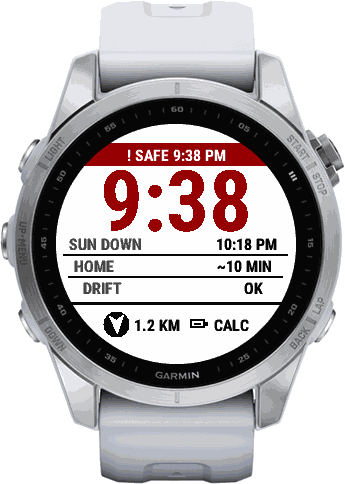
Last safe time
The latest time to head home.
Kuling shows a clock time: sunset, minus the time it takes you to get home, minus a margin. By default it assumes 4 kn on the way home and keeps a 30 minute margin, and you can change both. The time moves as you move. It turns red when 30 minutes or less are left, and stays red after it has passed. Sunset is worked out on the watch, so it works without the phone.
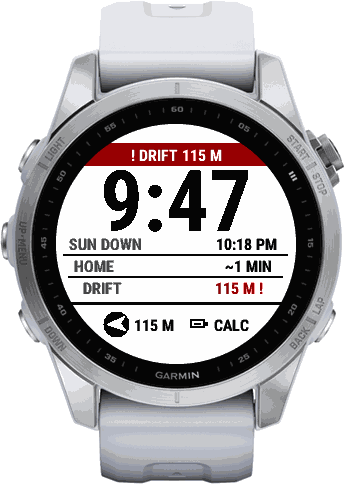
Drift warning
It notices when you drift.
If you move slower than 2 kn for more than 60 seconds while the distance to home grows by more than 30 metres, the watch warns you with a double vibration and a red band on every screen. The vibration repeats every 30 seconds while the warning stands.
It also reacts when you wade or paddle slowly away from home.
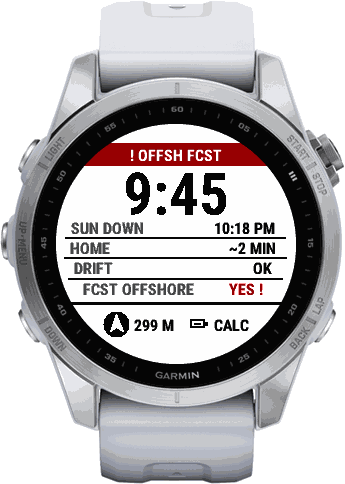
Offshore wind warning
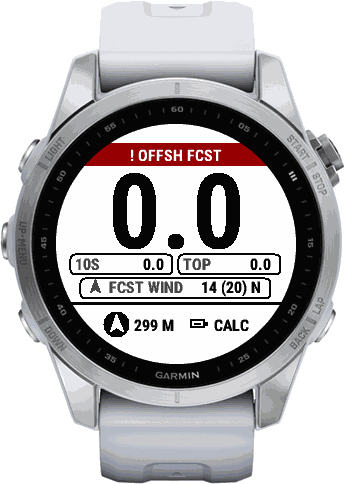
It warns when the forecast blows you out.
When the wind forecast says the wind blows from the home side out towards you, within 45 degrees of the direction home, and you are at least 100 metres from home, the watch shows a red band and gives one long vibration. It is a forecast for your area, never a measurement of the wind where you are.
Arrow and distance home
A fixed line at the bottom of every screen shows an arrow to your start point and the distance. You can move home on the GPS wait screen if you rig in another place than where you enter the water.
Vibration on your wrist
The warnings vibrate on your wrist. The red band also shows on the locked screen, so a locked watch still tells you.
Your session, in numbers.
The numbers are the reward after the safety. They are worked out live on the watch from GPS speed.
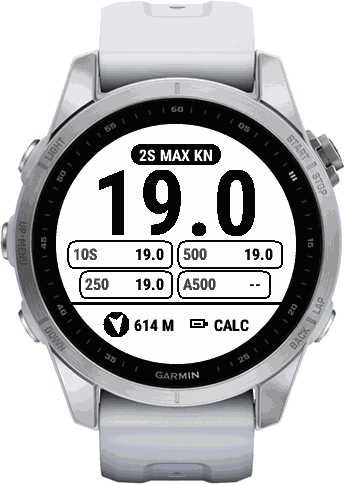
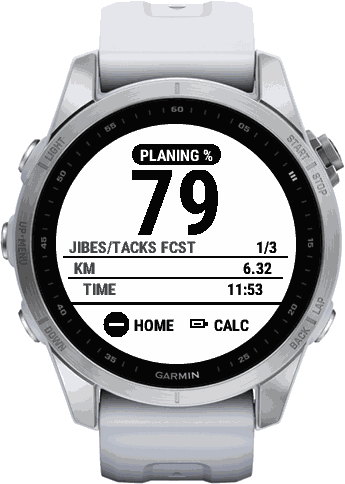
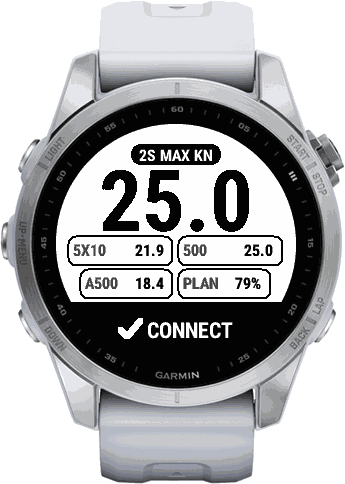
Speed and top speed
Speed now and your top speed, in knots, m/s or km/h.
Speed-sailing numbers
2 s max, best 10 s, 5x10, best 500 m and 250 m, and alpha 500. They are based on the published GP3S speed-sailing rules.
Planing %
The share of your active time above a planing speed you set (10 kn by default). It is Kuling's own measure, made for following your own progress from session to session.
Turns, jibes and tacks
Kuling counts your turns. When the wind forecast has a direction, it also splits them into jibes and tacks. That split is based on the forecast and is marked FCST on the watch.
Gear log
Pick your board and your rig (sail, wing or kite) before you start, or skip it. Built-in rig sizes are included, and you can add your own names in the Garmin Connect app. The gear is saved with the session.
Data in Garmin Connect
A saved session goes to Garmin Connect as a normal GPS activity, with the speed numbers, planing %, turns, jibes and tacks, forecast wind, gear and distance home over time added as FIT data.
The wind is always a forecast.
Kuling shows the wind forecast for your area on the watch. It is a forecast, never a measurement, and the watch labels it FCST.
- Gusts are shown where the forecast has them.
- Your exact position stays on the watch. Only the grid cell of about 5 x 5 km is used for the lookup.
- You can switch the wind forecast off in the settings. Then nothing is looked up and no wind is shown.
Forecast data: MET Norway.
Aids, not a guarantee.
The safety functions are aids. They do not replace your own judgement.
- Check the conditions and the forecast yourself.
- Sail within your abilities.
- Tell someone where you are.
- Warnings that depend on your position need a fresh GPS fix.
- Local wind can differ from the forecast, for example sea breeze or shelter behind dunes.
The watches Kuling is built for.
Kuling is made for these Garmin watches.
Forerunner
70, 165, 165 Music, 170, 170 Music, 255, 255 Music, 255s, 255s Music, 265, 265s, 570 42mm, 570 47mm, 955 / Solar, 965, 970
fenix
7, 7 Pro, 7 Pro - Solar Edition (no Wi-Fi), 7S, 7S Pro, 7X, 7X Pro, 7X Pro - Solar Edition (no Wi-Fi), 8 43mm, 8 47mm / 51mm, 8 Pro 47mm / 51mm / MicroLED, 8 Solar 47mm, 8 Solar 51mm, 9 43mm, 9 47mm / 51mm, 9 Pro 43mm, 9 Pro 47mm, 9 Pro 51mm, 9 Pro Solar 47mm, 9 Pro Solar 51mm, E
epix
(Gen 2), Pro (Gen 2) 42mm, Pro (Gen 2) 47mm, Pro (Gen 2) 51mm
tactix
7, 7 AMOLED Edition, 8 47mm / 51mm, 8 Solar 51mm
quatix
7, 7 Pro, 7 Sapphire, 7X Solar, 8 47mm / 51mm, 8 Pro 47mm / 51mm
Enduro
2, 3
MARQ
(Gen 2) Athlete / Adventurer / Captain / Golfer / Carbon Edition / Commander - Carbon Edition, (Gen 2) Aviator
Descent
G2, Mk3 43mm / Mk3i 43mm, Mk3i 51mm
Instinct
3 AMOLED 45mm, 3 AMOLED 50mm, Crossover AMOLED
D2
Mach 1, Mach 1 Pro, Mach 2, Mach 2 Pro
Short answers.
- What happens after the trial?
- After 4 free trips the watch shows a code of 6 characters. Enter it at offoverdrive.com/buy and subscribe for a year to keep using Kuling. Kuling never locks in the middle of a trip.
- Can I switch to another watch?
- Yes. Write to us at support@holmstadgroup.dk and we will move the subscription.
- What if I have no connection?
- The watch unlocks the next time it has a connection through your phone. Once unlocked, Kuling keeps working until the paid year ends plus 14 days. The arrow home, the last safe time and the drift warning run on the watch itself. The wind forecast needs your phone, and without it the wind line on the watch says NO PHONE or NO NET.
- How do I cancel?
- Any time through Stripe. The watch keeps working until the paid year ends plus a margin of 14 days.
- Who sees my data?
- The usage log is optional and anonymous, and you can switch it off. The wind forecast sends only a grid cell of about 5 x 5 km. The licence stores a one-way hash of your watch ID, your code and the number of trial trips used. Payment is handled securely by Stripe. Details: Privacy policy