
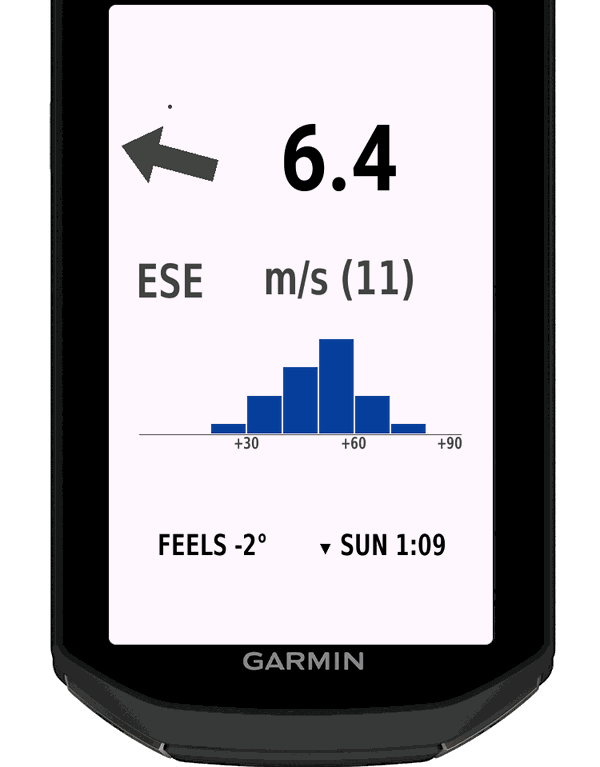
Try it free. Then a year at a time.
Five steps. You only need your Edge and your phone.
Install Vind Ride for free
Add it to a data screen in your ride profile. On the device the field is called Vind.
Your first 7 days are free
Use the field on every ride for 7 days.
Then the field shows a code
After the 7 days the field shows a code of 6 characters before your ride starts.
Enter the code and pay
Go to offoverdrive.com/buy, enter the code and pay at Stripe. It costs $9.99 or 89 kr. a year.
The field unlocks itself
Once you have bought it, the field unlocks by itself within 15 minutes while it is on screen. Your Edge fetches the subscription through the connection to your phone.
- Stripe sends your receipt by e-mail.
- Cancel any time through Stripe. You keep Vind Ride until the year you paid for ends.
Four answers on one screen.
Everything the weather does to your ride, at a glance and without leaving your data screen.
Wind
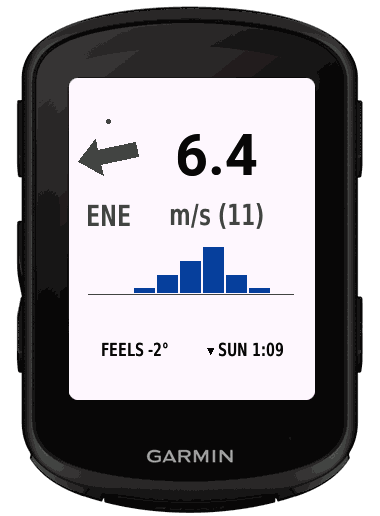
An arrow for the wind.
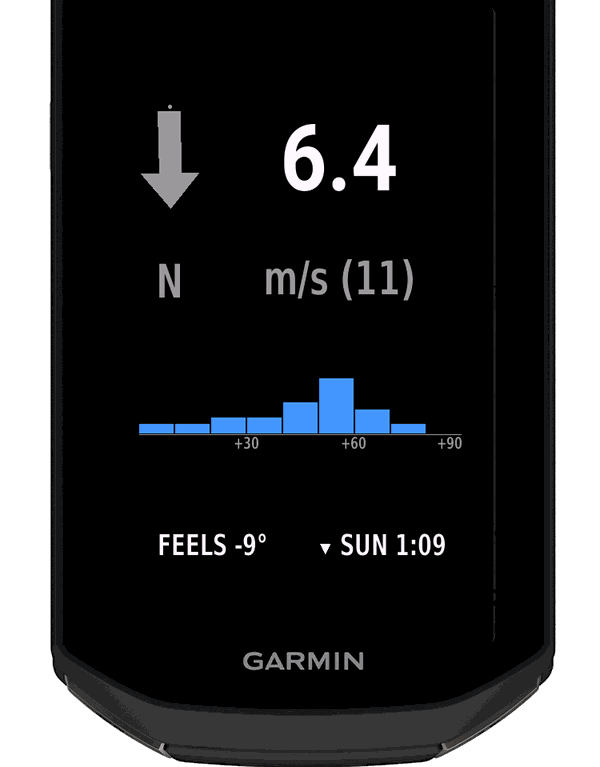
The arrow points the way the wind pushes you, drawn against your heading, so one glance tells you whether the wind is with you. It is green when the wind comes from behind (within 45 degrees), red when it is in your face (within 45 degrees) and grey when it is across you. The wind speed is the biggest number on the field, with gusts in brackets, in m/s, km/h, knots or Beaufort.
Standing still, the field shows the compass direction the wind comes from.
Rain
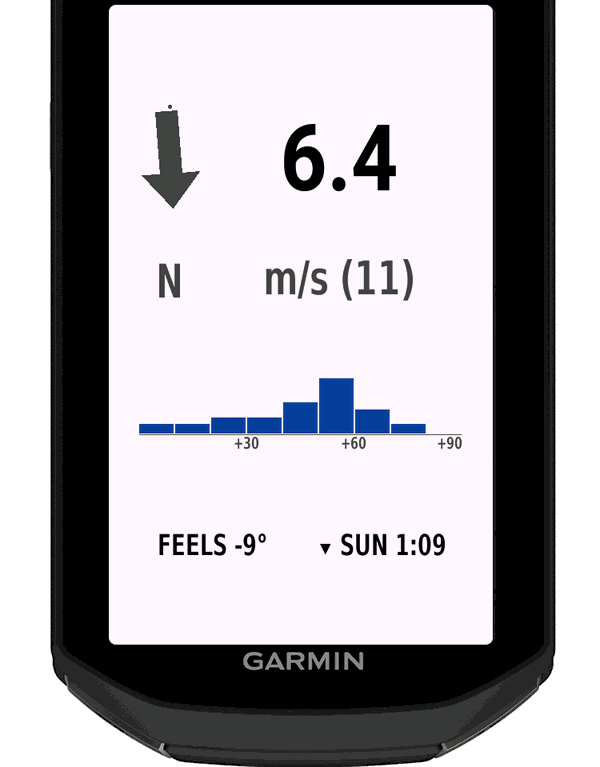
Rain for the next 90 minutes.
A row of blocks shows the next 90 minutes, one block for every 10 minutes. The taller the block, the heavier the rain. You get radar updates every 15 minutes in Norway, Sweden, Finland and eastern Denmark.
Wind chill
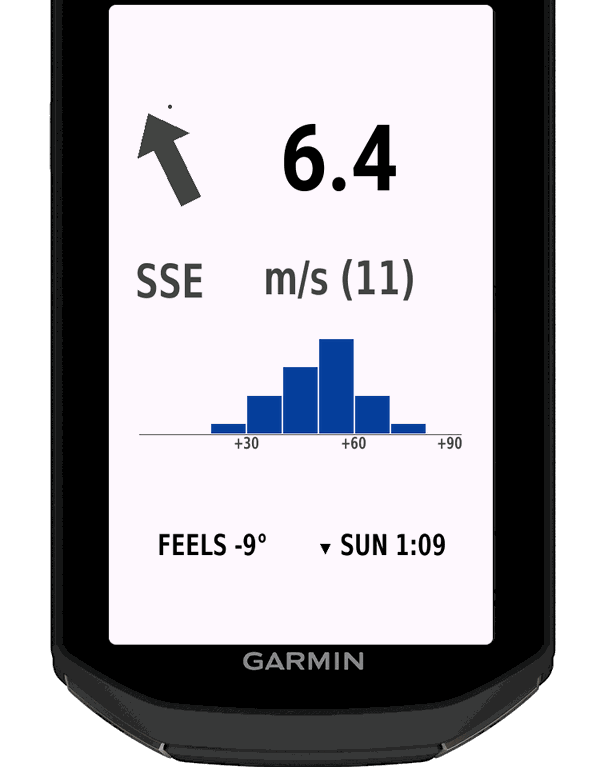
The cold you actually ride in.
The weather's wind is combined with the wind you make by riding, so the FEELS number is the cold you meet on the road, not what a standing rider would feel. It uses the standard wind chill formula whenever it is 10°C or below with about 5 km/h of wind over you. Otherwise the field shows the air temperature.
Sunset
Home before dark.
A countdown to sunset sits next to the feels-like number. It turns red when your estimated time home is longer than the daylight you have left. You choose how home is estimated: a straight line to the start, or the same way you came.
Light or dark
The field follows the background of your data screen, so it reads well by day and in the dark.
Your units
Metres per second, km/h, knots or Beaufort, in normal or large text. Set them in the Garmin Connect app, or change units on the Edge itself.
See the headwind before you ride.
Add your route on your page and see how much of the ride is into the wind, ridden as planned and ridden the other way round. Send the answer to your Edge, and it is in the field before you start.
Log in with your e-mail
You get a link by e-mail. There is no password.
Add your Edge
Enter the code and the PIN from Vind Ride's settings in the Connect IQ app. You only do this once.
Analyse a route
Choose a GPX file, your start time and your speed. You see the headwind along the whole route both ways round and can send the answer to your Edge.
From 3 hours before the start, the field shows, for example, ROUTE 34% HEAD and REVERSE 47% HEAD, so you can pick the way round with the least headwind.
Go to your pageWind anywhere you ride.
Wind and wind chill work all over the world. Rain for the next 90 minutes comes with radar updates every 15 minutes in Norway, Sweden, Finland and eastern Denmark.
- The wind is the forecast for your area, kept fresh while you ride.
- Fresh data within minutes of starting a ride, and then every 15 minutes.
- Your phone with the Garmin Connect app brings the data to your Edge, and a GPS fix tells the field which area to ask about.
- Wind, gusts, wind angle and feels-like are saved with your activity as graphs.
- Your position leaves your device only as a grid cell about 5 km across, never your exact position. The licence uses a one-way hash of your device ID. The field needs no account, and there are no ads.
Weather data from MET Norway (CC BY 4.0). Sunrise and sunset are calculated with the NOAA General Solar Position Calculations.
Made for these Garmin Edge devices.
Vind Ride runs on these Garmin Edge cycling computers.
Garmin Edge
- 540 / 540 Solar
- 550
- 840 / 840 Solar
- 850
- 1040 / 1040 Solar
- 1050
- Explore 2
- MTB
Short answers.
- What happens after the trial?
- After the 7 days the field shows a code of 6 characters before your ride starts. Enter it at offoverdrive.com/buy and subscribe for a year to keep using Vind Ride. It costs $9.99 or 89 kr. a year.
- Can I switch to another Edge?
- Yes. Write to us at support@holmstadgroup.dk and we will move the subscription.
- How do I cancel?
- Any time through Stripe. You keep Vind Ride until the year you paid for ends.
- What does it need?
- Your phone in range with the Garmin Connect app running, and a GPS fix, so the field knows which area to ask about.
- Who sees my data?
- Your position leaves your device only as a grid cell of about 5 km across, never your exact position. The licence stores a one-way hash of your device ID, your code and the date of first contact. The field needs no account, and there are no ads. Only the route analysis on the member page needs an e-mail to log in. Payment is handled securely by Stripe. Details: Privacy policy